Architecture & BIM Software Comparisons
IFC vs. BCF: Model Data vs. Model Issues (2026)
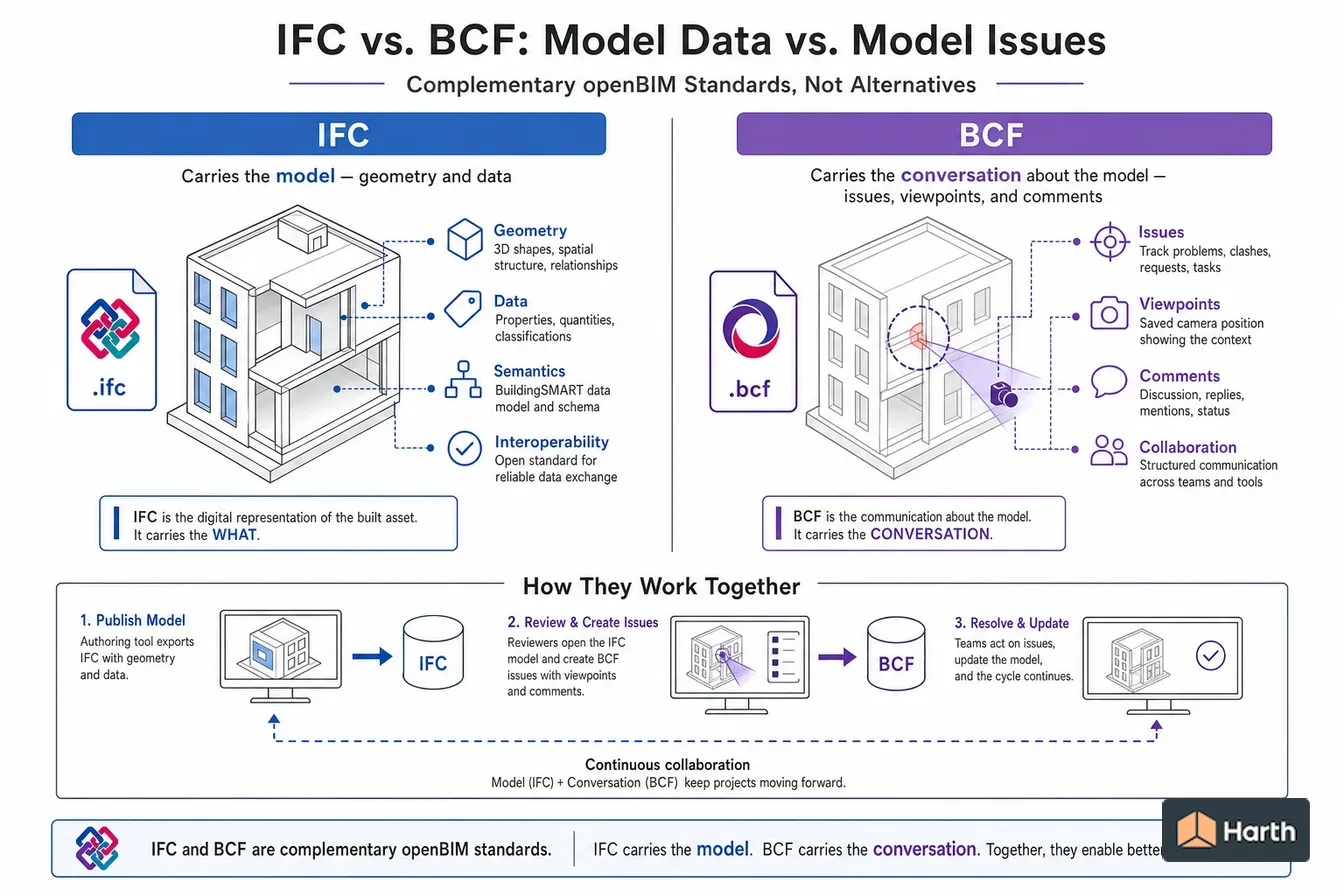
IFC carries the model — geometry and data; BCF carries the conversation about the model — issues, viewpoints, and comments. They are complementary openBIM standards, not alternatives.
On this page
Last updated October 27, 2026 · Compiled from buildingSMART primary specifications, checked 2026-10-27: the [BCF-XML specification and XSD schemas](https://github.com/buildingSMART/BCF-XML) (release_2_1 and release_3_0 documentation, change log and release tags), the [BCF API specification](https://github.com/buildingSMART/BCF-API), the [buildingSMART BCF overview](https://technical.buildingsmart.org/standards/bcf/) and the [IFC 4.3.2.0 release](https://standards.buildingsmart.org/IFC/RELEASE/IFC4_3/) published as [ISO 16739-1:2024](https://www.iso.org/standard/84123.html). Tool behaviour from [Archicad Help: Import Issues (BCF format)](https://help.graphisoft.com/AC/28/INT/_AC28_Help/082_IssueHandling/082_IssueHandling-14.htm) and the [BIMcollab Zoom free IFC viewer](https://www.bimcollab.com/en/go/free-ifc-viewer/). The sample IFC was generated with [IfcOpenShell](https://ifcopenshell.org/) 0.9.0 and the sample BCF was validated against the release_3_0 XSDs. Check the BCF and IFC versions each tool on your project supports before agreeing an exchange.
Direct answer
IFC (ISO 16739-1:2024) carries the building model and BCF 3.0 carries issues about it; both are open buildingSMART standards. IFC (Industry Foundation Classes) describes the building: elements, geometry, property sets and spatial structure. BCF (BIM Collaboration Format) describes a conversation about the building. Each BCF topic records a title, type, status, priority, assignee, comments and one or more viewpoints, and a viewpoint stores the camera position plus the 22-character IFC GlobalIds of the elements to select, hide or colour. Because BCF points at elements instead of copying them, a BCF file is usually a few kilobytes while the model it refers to can be hundreds of megabytes. BCF travels either as a zipped .bcf file (BCF-XML) or through the BCF API between servers. The final releases are BCF 2.0 (2014), 2.1 (2017) and 3.0 (2021). Use IFC to share the model and BCF to raise, assign and close issues on it across different software.
Content and cited inputs reviewed by Harth team · Published 2026-08-18 · Updated 2026-10-27.
What are the key takeaways?
- IFC is the model; BCF is the issue list about the model.
- A BCF viewpoint stores a camera and IFC GUIDs, not geometry, so the file stays small.
- BCF 3.0 (2021) is current; BCF 2.1 (2017) is still widely supported, so agree a version.
- A .bcf file is a zip of XML files and can be opened by any BCF-capable tool.
What is the difference between IFC and BCF?
IFC and BCF are two buildingSMART standards that are designed to be used together. IFC (Industry Foundation Classes) is the model: walls, slabs, doors, spaces, their geometry and their properties. BCF (BIM Collaboration Format) is the issue tracker for that model: "this duct clashes with that beam, please fix by Friday," stored in a form any BCF-capable tool can open.
| Dimension | IFC | BCF |
|---|---|---|
| Carries | The building model | Issues (topics) about the model |
| Typical content | Elements, geometry, property sets, storeys and spaces | Title, type, status, priority, assignee, comments, viewpoints, snapshots |
| How elements are identified | Each element has a 22-character GlobalId | Viewpoints list those GlobalIds as IfcGuid |
| Typical size | Megabytes to gigabytes | Kilobytes per issue, plus snapshots |
| File format | .ifc (STEP text), .ifcXML, .ifcZIP | .bcf (zip of XML files); BCF API for server-to-server |
| Standard status | ISO 16739-1:2024 for IFC 4.3.2.0 | buildingSMART standard; current release BCF 3.0 (2021) |
| Can it replace the other? | No | No |
The link between them is the element identifier. When a reviewer selects a wall in an IFC model and raises an issue, the BCF viewpoint records the wall's GlobalId and the camera. The author opens that BCF in their own tool, which finds the same wall in their native model because the GlobalId was written when the IFC was exported. No geometry is copied, so the issue travels in kilobytes.
What is a BCF file?
A BCF-XML file is a zip archive. Since BCF 2.1 the extension is .bcf; BCF 1.0 and 2.0 used .bcfzip. Inside it there is one folder per topic, named with the topic's GUID, and a few files at the root:
- bcf.version: the BCF version used (for example 3.0).
- extensions.xml (BCF 3.0): the project's allowed topic types, statuses, priorities, labels, users and stages.
- project.bcfp (optional): the project ID and name.
- documents.xml (optional, BCF 3.0): a register of attached documents stored in a Documents folder.
- In each topic folder, markup.bcf holds the issue itself, .bcfv files hold viewpoints, and PNG or JPEG files hold snapshots.
A viewpoint records a perspective or orthogonal camera, an optional list of selected components, a visibility rule (show everything except listed exceptions, or hide everything except listed exceptions), colouring, clipping planes and markup lines. All lengths are in metres and angles in degrees. The specification recommends keeping selections and visibility exceptions small: clients should warn the user when more than 1,000 components are listed.
What changed between BCF 2.1 and BCF 3.0?
| Topic | BCF 2.1 (January 2017) | BCF 3.0 (June 2021) |
|---|---|---|
| Root files | bcf.version, optional project.bcfp | Adds a required extensions.xml and an optional documents.xml |
| Project extensions | Referenced through a schema file | Stored as data in extensions.xml inside the archive |
| Viewpoint and snapshot names | One viewpoint must be named viewpoint.bcfv and one snapshot snapshot.png | Names are referenced from the markup; no fixed default names |
| Snapshot format | PNG | PNG or JPEG, longest side no more than 1,500 px |
| Attached documents | Referenced by relative path | Stored under Documents by GUID and listed in documents.xml |
| Issue numbering | Topic GUID plus optional index | Adds a server-controlled, human-friendly ServerAssignedId |
Support for BCF 3.0 varies between tools, so the BIM execution plan should name the BCF version, just as it names the IFC version.
How do IFC and BCF work together in a coordination cycle?
- Each discipline exports its model to IFC using the version and model view agreed for the project.
- A coordinator federates the IFC models in a review or clash-detection tool.
- Each problem is saved as a BCF topic with a viewpoint, the affected element GUIDs, a status, a priority and an assignee.
- The BCF file is sent to the responsible author, or synchronised through a BCF API server.
- The author opens the topic in their authoring tool, which zooms to the elements, fixes the native model and comments on the topic.
- The next IFC export carries the fix, the coordinator verifies it, and the topic is closed.
The loop works only if GlobalIds stay stable between exports. Re-creating elements, or exporting with settings that regenerate identifiers, breaks the link between existing issues and the model.
How do you open a BCF file?
Open it in a tool that reads BCF, with the matching IFC or native model loaded. Archicad's Issue Organizer imports BCF and identifies Archicad elements through the IFC GUIDs they already carry. BIMcollab Zoom reads IFC and BCF in its free mode, and BIMcollab's plug-ins open the same issues inside Revit, Navisworks, Archicad and Solibri. To look at the raw content, copy the file, rename it to .zip and open the XML in a text editor.
If an issue opens but nothing is selected, the GUIDs in the BCF do not match the loaded model. Check that you loaded the same model version the reviewer used.
Should you exchange BCF files or use the BCF API?
BCF comes in two forms that carry the same information. BCF-XML is the file described above: export a .bcf, send it by email or a shared folder, and import it on the other side. It needs no shared server, but every party ends up with copies, and statuses drift unless one person owns the master list. The BCF API is a buildingSMART web-service specification that lets authoring tools, viewers and issue servers read and update the same topics directly, so a comment added in one tool appears in the others without passing files around. Both are maintained by buildingSMART's Open CDE workgroup. Small teams often start with files; projects with many consultants usually benefit from a shared issue server that supports the API.
One clash, two files: a validated IFC and BCF sample
To show exactly what each standard carries, Harth built a matched pair on 2026-10-27: a one-wall IFC4 model generated with IfcOpenShell 0.9.0, and a BCF 3.0 issue that points at that wall. All four BCF XML files validated against the official buildingSMART BCF 3.0 XSD schemas (markup.xsd, visinfo.xsd, extensions.xsd and version.xsd from the release_3_0 branch).
| Item | IFC file | BCF file |
|---|---|---|
| Size | About 2.3 KB | About 2.1 KB (zip) |
| Contents | 40 entities: project, site, building, storey, one wall, its geometry and Pset_WallCommon | bcf.version, extensions.xml, one topic folder with markup.bcf and one .bcfv viewpoint |
| The wall | IFCWALL('3s_AI_eP9C$gPX6Iv_4jwi',$,'W-101',...) with FireRating 1HR | Referenced only as Component IfcGuid="3s_AI_eP9C$gPX6Iv_4jwi" in the viewpoint's Selection |
| Project link | IFCPROJECT('3SEks_aRnFzv6LyZyH90jV',...) | Header File IfcProject="3SEks_aRnFzv6LyZyH90jV" and the storey's GUID as IfcSpatialStructureElement |
| What the issue says | Not applicable | Title "Duct penetrates rated wall W-101 without a listed firestop", type Clash, status Open, priority High, assignee, one comment |
| Camera | Not applicable | PerspectiveCamera with viewpoint, direction, up vector and 60 degree field of view, in metres |
| Geometry copied | Yes, the wall's extruded profile | None |
The pair makes the division of labour concrete: delete the IFC and the BCF still opens, but it has nothing to select; delete the BCF and the model is unchanged, but the reason the wall needs attention is lost.
What each standard carries, references and cannot replace
| Question | IFC | BCF |
|---|---|---|
| Does it carry geometry? | Yes | No; only a camera and optional snapshot images |
| Does it carry element properties? | Yes, in property sets | No; it references elements by GUID |
| Does it carry status, assignee and due date? | No | Yes, in markup.bcf |
| Does it carry discussion? | No | Yes, as dated comments by author |
| Can it be sent without the other? | Yes, as a model exchange | Yes, but it is only useful alongside the matching model |
| Which version to agree? | IFC2x3, IFC4 or IFC 4.3 plus a model view | BCF 2.1 or BCF 3.0 |
| What breaks the link? | Regenerated GlobalIds on re-export | Opening the issue against a different model version |
Where can you explore related guidance?
- Explore all comparisons guidance
- IFC vs. RVT: Open Exchange vs. Native Revit (2026)
- CAD vs. BIM: What's the Real Difference? (2026)
Sources and method
Compiled from buildingSMART primary specifications, checked 2026-10-27: the BCF-XML specification and XSD schemas (release_2_1 and release_3_0 documentation, change log and release tags), the BCF API specification, the buildingSMART BCF overview and the IFC 4.3.2.0 release published as ISO 16739-1:2024. Tool behaviour from Archicad Help: Import Issues (BCF format) and the BIMcollab Zoom free IFC viewer. The sample IFC was generated with IfcOpenShell 0.9.0 and the sample BCF was validated against the release_3_0 XSDs. Check the BCF and IFC versions each tool on your project supports before agreeing an exchange.
Source links
Frequently asked questions
What is a BCF file?
A BCF file is a zip archive, with the .bcf extension since BCF 2.1 (.bcfzip before that), holding one folder per issue. Each folder contains a markup.bcf XML file with the issue's title, status, comments and assignee, plus viewpoint files (.bcfv) and optional PNG or JPEG snapshots. The root holds a bcf.version file and, in BCF 3.0, an extensions.xml file.
What does BCF stand for in BIM?
BCF stands for BIM Collaboration Format. It is an open buildingSMART standard for exchanging model-based issues between different BIM tools. The acronym is also used for unrelated terms in finance and other fields; on BIM and openBIM projects it always means the issue format.
What is an IFC in BIM?
IFC (Industry Foundation Classes) is the open, vendor-neutral schema for describing a building model so that one BIM tool can read what another wrote. It is maintained by buildingSMART International, and the current release, IFC 4.3.2.0, is published as ISO 16739-1:2024. IFC2x3 and IFC4 remain the versions most tools exchange today.
How do I open a BCF file?
Open it in a BCF-capable tool together with the IFC model it refers to. Archicad's Issue Organizer imports BCF directly, BIMcollab Zoom reads BCF in its free mode, and Revit users can open BCF issues through add-ins such as BIMcollab's. Because a .bcf file is a zip, renaming a copy to .zip also lets you inspect the XML in any text editor.
Is BCF 3.0 compatible with BCF 2.1?
Not directly. BCF 3.0 changed the file structure: it adds a required extensions.xml, an optional documents.xml and server-assigned issue numbers, allows JPEG snapshots, and drops the fixed viewpoint.bcfv and snapshot.png names. Tools that read only 2.1 may not open a 3.0 file, so agree the version in the BIM execution plan.
Where are the BCF specifications on GitHub?
buildingSMART publishes the file format in the BCF-XML repository (github.com/buildingSMART/BCF-XML), with XSD schemas, documentation and test cases for each release, and the web-service version in the BCF-API repository (github.com/buildingSMART/BCF-API). Both are maintained by buildingSMART's Open CDE workgroup.
Related pages
- ASCE 7-16 vs. ASCE 7-22: What Changed? (2026)
ASCE 7-16 vs. 7-22: tornado loads (Ch. 32), reliability-targeted snow, multi-period seismic spectra, which IBC edition uses each, and USGS values compared.
- CAD vs. BIM: What's the Real Difference? (2026)
CAD vs. BIM for architects: drawings vs. a data-rich model, whether Revit and AutoCAD are BIM or CAD, which to learn, and when each fits.
- IBC vs. IRC: Which Building Code Applies? (2026)
IBC vs. IRC: the IRC covers houses, duplexes and townhouses up to 3 stories (R101.2); the IBC covers everything else. Decision tree and worked examples.
- IFC vs. RVT: Open Exchange vs. Native Revit (2026)
IFC vs. RVT: what each file carries, which IFC version Revit exports, how to open IFC in Revit, and when to share each format.