Architecture & BIM Software Comparisons
IFC vs. RVT: Open Exchange vs. Native Revit (2026)
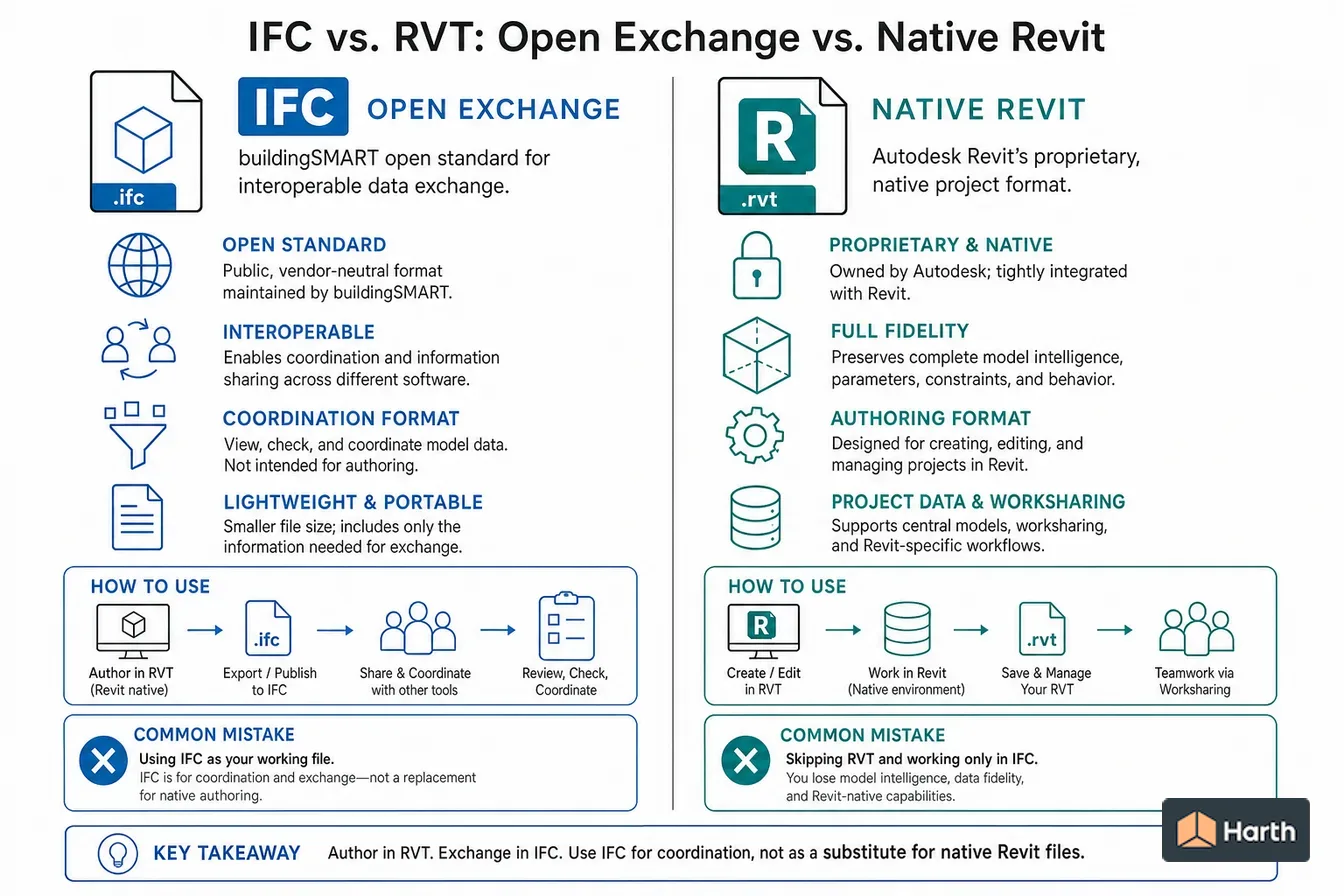
RVT is Revit's proprietary native format; IFC is the open buildingSMART exchange format. You author in RVT and exchange in IFC — IFC is a coordination format, not a replacement for native files.
On this page
Last updated October 27, 2026 · Compiled from buildingSMART and Autodesk primary documentation, checked 2026-10-27. IFC releases and ISO numbers from the [buildingSMART IFC specifications database](https://technical.buildingsmart.org/standards/ifc/ifc-schema-specifications/) and the [IFC 4.3.2.0 release](https://standards.buildingsmart.org/IFC/RELEASE/IFC4_3/) published as [ISO 16739-1:2024](https://www.iso.org/standard/84123.html). Revit export options from [Revit 2026 IFC Export Setup Options](https://help.autodesk.com/cloudhelp/2026/ENU/Revit-DocumentPresent/files/GUID-E029E3AD-1639-4446-A935-C9796BC34C95.htm); exporter release notes from [Autodesk revit-ifc on GitHub](https://github.com/Autodesk/revit-ifc/releases); RVT version behaviour from [Autodesk support: backward compatibility of Revit](https://www.autodesk.com/support/technical/article/caas/sfdcarticles/sfdcarticles/Backwards-compatibility-of-Revit-with-earlier-releases-of-the-software.html); viewer support from [Autodesk Viewer](https://viewer.autodesk.com/). The annotated IFC sample was generated with [IfcOpenShell](https://ifcopenshell.org/) 0.9.0. Menu names and options change between Revit releases; check them against the release you use.
Direct answer
RVT is Autodesk Revit's proprietary native format. It stores the full parametric project, including families, constraints, views and sheets, and it is not backward compatible: once a model is upgraded and saved in a newer Revit release, older releases cannot open it. IFC (Industry Foundation Classes) is an open schema maintained by buildingSMART International. The current release, IFC 4.3.2.0, is published as ISO 16739-1:2024, while IFC2x3 and IFC4 remain the versions most tools exchange day to day. Revit can open or link an IFC file, and its export dialog offers IFC2x3 Coordination View 2.0, IFC4 Reference View and IFC4 Design Transfer View. Use RVT to author and archive the design model, and IFC to hand the model to consultants, contractors, checkers and owners who work in other software. Agree the IFC version and model view before the first exchange, because the model view controls which geometry and data the recipient actually receives.
Content and cited inputs reviewed by Harth team · Published 2026-08-18 · Updated 2026-10-27.
What are the key takeaways?
- RVT is the editable Revit original; IFC is the vendor-neutral copy you exchange.
- IFC 4.3.2.0 is ISO 16739-1:2024, but IFC2x3 and IFC4 are still the versions most exchanges use.
- Pick the IFC version and model view with the recipient before exporting.
- Revit cannot open an RVT saved by a newer release; IFC is the usual way to pass data back.
What is the difference between IFC and RVT?
RVT and IFC answer different questions. RVT is how Revit stores a project it is actively editing. IFC (Industry Foundation Classes) is how any BIM tool describes a building so that a different tool can read it. Comparing them is less like comparing two competing formats and more like comparing a word-processor document with a PDF of it.
| Dimension | RVT | IFC |
|---|---|---|
| Owner | Autodesk (proprietary, unpublished format) | buildingSMART International (open schema) |
| Standard | None outside Autodesk | ISO 16739-1:2024 for IFC 4.3.2.0 |
| Written by | Revit only | Revit, Archicad, Vectorworks, Tekla, Allplan and most other BIM tools |
| Content | Full parametric project: families, constraints, views, sheets, worksets | Elements, geometry, property sets, classification and spatial relationships |
| Editability in other tools | None | Readable everywhere; editing depends on the receiving tool |
| Version behaviour | Not backward compatible; newer Revit upgrades the file | Schema versions are fixed; a tool states which ones it supports |
| File types | .rvt (projects), .rfa (families), .rte (templates) | .ifc (STEP text), .ifcXML, .ifcZIP |
| Best use | Authoring and archiving the design model | Coordination, model checking, handover and long-term open records |
Autodesk's own support guidance confirms the key practical limit of RVT: a model upgraded and saved in a newer release cannot be opened in an earlier one, and Revit has no "save as older version" option. Exporting IFC from the newer release is the route Autodesk suggests for moving data back, accepting that some Revit-specific data will not survive.
When should you share RVT and when should you share IFC?
Send RVT when the recipient is on Revit, at the same or a newer release, and genuinely needs to edit or host elements in your model, such as an architect handing a linked model to a Revit-based structural engineer under a shared coordinate system.
Send IFC in every other case:
- consultants authoring in Archicad, Vectorworks, Tekla, Allplan or another platform;
- model checking and clash detection in tools that read IFC;
- contractors and fabricators who need geometry and properties, not your families;
- owners, facility managers and public clients who specify open formats for handover;
- archiving a record that will still be readable when today's Revit release is retired.
On large projects both are common: RVT inside the Revit team, IFC to everyone else, with the exchange format written into the BIM execution plan.
Which IFC version should you export?
Choose the version the recipient's software is certified or tested for, not simply the newest one.
| IFC release | Year | ISO publication | Where it fits today |
|---|---|---|---|
| IFC2x3 TC1 | 2007 | ISO/PAS 16739:2005 | Revit's help calls IFC2x3 Coordination View 2.0 its default certified export and the version generally supported by other systems |
| IFC4 ADD2 TC1 | 2017 | ISO 16739-1:2018 | Reference View for coordination; Design Transfer View when the recipient needs editable geometry |
| IFC 4.3 ADD2 (4.3.2.0) | 2024 | ISO 16739-1:2024 | Adds infrastructure entities for road, rail, bridges, ports and waterways; check the receiving tool supports it |
The model view matters as much as the schema. IFC4 Reference View is intended as a reference model that is not modified, which is the right choice for coordination. IFC4 Design Transfer View is intended for handing over a model the recipient will continue to edit, and Revit may write advanced B-rep geometry for it. Revit 2026's IFC Export Setup lists IFC2x3 Coordination View 2.0, IFC4 Reference View and IFC4 Design Transfer View among its options, and Autodesk's open-source exporter on GitHub has added IFC 4.3 support in recent builds.
How do you export IFC from Revit without losing what the recipient needs?
- Agree the target with the recipient: IFC version, model view, coordinate base and the property sets they will read.
- Map categories to IFC classes in the export mapping table, so custom families export as IfcWall, IfcDoor or IfcFurniture rather than a generic IfcBuildingElementProxy.
- Choose property sets: the standard IFC common sets (such as Pset_WallCommon) plus any user-defined sets the project requires.
- Set coordinates to the shared site or survey point the team agreed, so models align when combined.
- Export a test file and open it in a viewer before the formal issue. Check element counts by level, a few property values and the location against another discipline's model.
Save the export setup with a project-specific name so every issue uses the same settings.
How do you open or convert an IFC file in Revit?
Revit offers two routes. Open IFC converts the file into a new Revit project; save it as RVT if you want to keep the conversion. Link IFC places the IFC as a linked reference that reloads when the source changes, writing helper files (an .ifc.RVT conversion and a log) beside the original.
Either way, imported elements are representations of someone else's model. They carry IFC properties and correct geometry, but they generally do not behave like native, parametric Revit families. When you need editable content, model it natively in Revit with the IFC as a guide.
Common mistakes
- Treating a received IFC as an editable native model, then reporting "broken" walls and doors.
- Exporting the newest IFC version to a consultant whose software only reads IFC2x3.
- Leaving family categories unmapped, so most of the model arrives as anonymous proxies.
- Sending RVT to a team on an older Revit release, who cannot open it at all.
- Skipping a viewer check, so missing levels or shifted coordinates are found by the recipient instead of the sender.
What an IFC file contains: an annotated minimal example
To show what IFC actually carries, Harth generated a one-wall IFC4 file with IfcOpenShell 0.9.0 on 2026-10-27 and read it back. The whole file is a plain-text STEP physical file (ISO 10303-21) of about 2.3 KB and 40 entities. Every element is readable in any text editor, which is a property RVT does not have.
| Line or entity in the file | What it records | Why it matters in an exchange |
|---|---|---|
ISO-10303-21; | STEP physical file format | Any IFC-capable tool can parse it, with or without Revit |
FILE_DESCRIPTION(('ViewDefinition [ReferenceView_V1.2]'),'2;1'); | The model view the file claims to follow | Tells the recipient what content to expect |
FILE_SCHEMA(('IFC4')); | The schema version | The first thing to check when a tool refuses a file |
IFCPROJECT, IFCSITE, IFCBUILDING, IFCBUILDINGSTOREY | Spatial structure, linked by IFCRELAGGREGATES | Levels survive the exchange as named storeys |
IFCWALL('3s_AI_eP9C$gPX6Iv_4jwi',$,'W-101',...) | One wall with its 22-character GlobalId and name | The GlobalId is what issue files (BCF) and later exports use to find this exact wall |
IFCEXTRUDEDAREASOLID(...,3000.) | Geometry as a 5,000 by 200 mm profile extruded 3,000 mm | Geometry is explicit, not a parametric Revit wall type |
IFCPROPERTYSET('...','Pset_WallCommon',...) with FireRating, IsExternal, LoadBearing | Standard properties attached to the wall | Checkers and estimators read these without Revit |
What the file does not contain is just as instructive: no wall type definition that can be re-dimensioned, no constraints, no views, no sheets and no families. Those exist only in RVT.
RVT or IFC: exchange decision matrix
| Exchange scenario | Send | IFC version and view to agree | What the recipient can do | Check before sending |
|---|---|---|---|---|
| Revit architect to Revit engineer, same release | RVT (linked) | Not applicable | Link, host and copy-monitor elements | Shared coordinates and Revit release match |
| Revit architect to Archicad or Vectorworks consultant | IFC | IFC2x3 CV 2.0 or IFC4 Reference View, per their software | Reference the model and coordinate against it | Category mapping, storeys and survey point |
| Model to a clash-detection or code-checking tool | IFC | Version listed in the checker's documentation | Run rules and clash tests on elements and properties | Required property sets exported |
| Design model to contractor for quantities | IFC | IFC4 Reference View with agreed property sets | Take off counts, lengths, areas and volumes | Quantities and classification fields populated |
| Owner or FM handover | IFC (plus COBie if specified) | As written in the owner's information requirements | Import assets into their systems | Asset identifiers and room names complete |
| Long-term record copy | IFC alongside the final RVT | Latest version the owner's tools support | Read the model without a Revit licence | File opens in an independent viewer |
| Return data to an older Revit release | IFC | IFC4 Reference View or IFC2x3 CV 2.0 | Open as a converted project | Accept loss of Revit-only data |
Where can you explore related guidance?
- Explore all comparisons guidance
- IFC vs. BCF: Model Data vs. Model Issues (2026)
- CAD vs. BIM: What's the Real Difference? (2026)
Sources and method
Compiled from buildingSMART and Autodesk primary documentation, checked 2026-10-27. IFC releases and ISO numbers from the buildingSMART IFC specifications database and the IFC 4.3.2.0 release published as ISO 16739-1:2024. Revit export options from Revit 2026 IFC Export Setup Options; exporter release notes from Autodesk revit-ifc on GitHub; RVT version behaviour from Autodesk support: backward compatibility of Revit; viewer support from Autodesk Viewer. The annotated IFC sample was generated with IfcOpenShell 0.9.0. Menu names and options change between Revit releases; check them against the release you use.
Source links
Frequently asked questions
Can I open an IFC file in Revit?
Yes. Revit has two routes. Open IFC converts the file into a new Revit project, which you can then save as RVT. Link IFC keeps the IFC as a reference that reloads when the source file changes; Revit creates a helper file named with the .ifc.RVT extension next to it. Linking is the better choice for consultant models you do not own.
How do I convert IFC to RVT?
Open the IFC in Revit and save the result as an RVT. The conversion maps IFC entities to Revit categories and keeps their properties, but imported elements generally do not behave like native, parametric Revit families. If you need to edit a wall or door type properly, remodel it natively using the imported geometry as a guide.
How can I convert Revit files to IFC files?
In Revit, use File > Export > IFC, choose the IFC version and model view the recipient asked for (for example IFC2x3 Coordination View 2.0 or IFC4 Reference View), set the file type, then review the category mapping and property sets in Modify Setup. Autodesk maintains the exporter as open source and publishes updated builds on GitHub.
What can open an RVT file?
Revit itself, in the same release or a newer one, is the only tool that edits RVT. The free browser-based Autodesk Viewer can display RVT models, and Autodesk Navisworks reads RVT for review and clash detection. Teams using Archicad, Vectorworks, Tekla or other tools should be sent an IFC export instead.
What is an IFC viewer?
An IFC viewer opens .ifc files for review without an authoring licence. Free options include the viewing mode of BIMcollab Zoom and the Autodesk Viewer, and every major BIM authoring tool can also import IFC. Use a viewer to check an export before you send it: confirm elements, levels, property sets and coordinates arrived as expected.
Is IFC or RVT better for BIM sharing?
Share RVT only when every recipient uses Revit at the same or a newer release and needs to edit the model. Share IFC for consultants on other platforms, model checking, contractors and owner handover, because it is an ISO standard any certified tool can read. Many projects send both: RVT within the Revit team and IFC to everyone else.
Related pages
- ASCE 7-16 vs. ASCE 7-22: What Changed? (2026)
ASCE 7-16 vs. 7-22: tornado loads (Ch. 32), reliability-targeted snow, multi-period seismic spectra, which IBC edition uses each, and USGS values compared.
- CAD vs. BIM: What's the Real Difference? (2026)
CAD vs. BIM for architects: drawings vs. a data-rich model, whether Revit and AutoCAD are BIM or CAD, which to learn, and when each fits.
- IBC vs. IRC: Which Building Code Applies? (2026)
IBC vs. IRC: the IRC covers houses, duplexes and townhouses up to 3 stories (R101.2); the IBC covers everything else. Decision tree and worked examples.
- IFC vs. BCF: Model Data vs. Model Issues (2026)
IFC vs. BCF: IFC shares the model, BCF shares issues about it. What a .bcf file contains, BCF 2.1 vs 3.0, and how to open one.